Toggle Nav


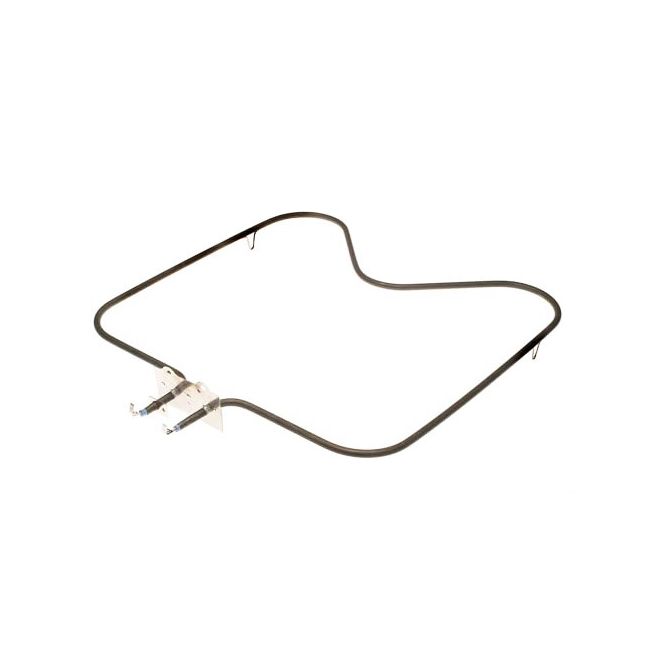


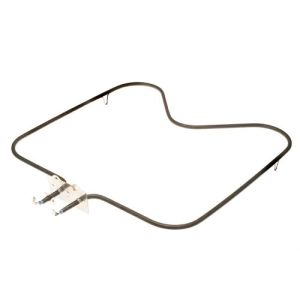
Whirlpool Bake Element WP7406P012-60 OEM Part
was
$100.99
Special Price
$62.99
This manufacture part number # WP7406P012-60 replaces our competitor’s part numbers: AP4101670, 1938-324, 1938-325, 1938-352, 1938324, 1938352, 1938362, 2188, AH2089584, EA2089584, PS2089584, 7406P01260, 54353, 54-856, 54-353, RP856, 7406P012-60.
MFG Number
WP7406P012-60
Availability:
In stock
In stock items are shipped the same day on all orders made before 4 PM Eastern Time. Orders made after 4 PM Eastern Time, Weekend or a Holiday will ship the following business day.
Oven Baking Element Overview
Positioned at the base of the oven, the bake heating element is crucial for effectively warming food. A malfunctioning element may be responsible if the oven exhibits insufficient or uneven heating during baking.
Whirlpool, a leading manufacturer, produces this component, compatible with their own brands such as Amana, KitchenAid, Maytag, Jenn-Air, Magic Chef, Roper, and Admiral, along with products for Sears-Kenmore and Ikea.
Original Equipment Manufacturer (OEM) Part: Designed by Whirlpool, guaranteeing compatibility and reliability with Maytag and Magic Chef appliances.
Spade Style Connections: Features spade terminals for secure and straightforward electrical installation.
Precise Fit: Measures 16x16 inches with 2-inch deep terminals, ensuring compatibility with designated models.
Typical Issues with Maytag Magic Chef Bake Element WP7406P012-60:
- Lack of or uneven heating
- Visible physical damage to the element
- Extended preheating times
- Variations in baking performance
Troubleshooting Maytag Magic Chef Bake Element WP7406P012-60:
1. Conduct a Visual Inspection: Look for any signs of damage such as blisters, fractures, or discoloration.
2. Perform a Continuity Test: Use a multimeter to verify continuity; absence indicates the need for replacement.
Installation Guide for Maytag Magic Chef Bake Element WP7406P012-60:
1. Prioritize Safety: Disconnect the oven from its power source by unplugging or turning off the circuit breaker.
2. Remove the Existing Element: Take out the oven racks, unscrew the mounts, and gently remove the element to access the connections.
3. Replace and Reconnect: Detach the old element's spade connectors and attach the new element. Secure it with the existing screws.
4. Verify Installation: Restore power and briefly activate the oven to confirm the element functions properly.
Positioned at the base of the oven, the bake heating element is crucial for effectively warming food. A malfunctioning element may be responsible if the oven exhibits insufficient or uneven heating during baking.
Whirlpool, a leading manufacturer, produces this component, compatible with their own brands such as Amana, KitchenAid, Maytag, Jenn-Air, Magic Chef, Roper, and Admiral, along with products for Sears-Kenmore and Ikea.
Original Equipment Manufacturer (OEM) Part: Designed by Whirlpool, guaranteeing compatibility and reliability with Maytag and Magic Chef appliances.
Spade Style Connections: Features spade terminals for secure and straightforward electrical installation.
Precise Fit: Measures 16x16 inches with 2-inch deep terminals, ensuring compatibility with designated models.
Typical Issues with Maytag Magic Chef Bake Element WP7406P012-60:
- Lack of or uneven heating
- Visible physical damage to the element
- Extended preheating times
- Variations in baking performance
Troubleshooting Maytag Magic Chef Bake Element WP7406P012-60:
1. Conduct a Visual Inspection: Look for any signs of damage such as blisters, fractures, or discoloration.
2. Perform a Continuity Test: Use a multimeter to verify continuity; absence indicates the need for replacement.
Installation Guide for Maytag Magic Chef Bake Element WP7406P012-60:
1. Prioritize Safety: Disconnect the oven from its power source by unplugging or turning off the circuit breaker.
2. Remove the Existing Element: Take out the oven racks, unscrew the mounts, and gently remove the element to access the connections.
3. Replace and Reconnect: Detach the old element's spade connectors and attach the new element. Secure it with the existing screws.
4. Verify Installation: Restore power and briefly activate the oven to confirm the element functions properly.
Write Your Own Review
Loading compatible models...